How to Compress Images Fast Without Losing Quality
Whether you publish articles on a blog, sell products in an online store, or design professional portfolios, the weight of your images is the deciding factor between a lightning-fast site and one that loses visitors every second. In this step-by-step guide, you'll learn how to compress images in bulk without sacrificing sharpness using the OmniPixy suite.
1. Why Image Compression Is SEO Optimization #1
The vast majority of load-speed problems on websites don't come from code or the server, but from massive images uploaded with zero prior processing. A single photo taken directly with a smartphone or DSLR can weigh between 4 MB and 12 MB.
For a user browsing on mobile over a 4G connection, loading a page with 5 unoptimized images means downloading over 30 MB of data. That spikes the bounce rate (users leaving before the page even loads) and tanks your Google Core Web Vitals score (especially the LCP metric).
2. The Difference Between Lossy and Lossless Compression
To compress correctly, it's essential to understand the two main approaches:
- Lossless compression: Removes only unnecessary metadata and reorganizes the file's internal data structure. Cuts weight by 5% to 15% without altering a single pixel of the photo. Ideal for corporate graphics or logos.
- Smart lossy compression: Removes subtle chromatic nuances that the human eye can't perceive on standard screens. Can reduce file size by 60% to 85% while keeping an impeccable appearance. It's the recommended choice for web photography and e-commerce.
Optimize Your Images in Bulk, in Seconds
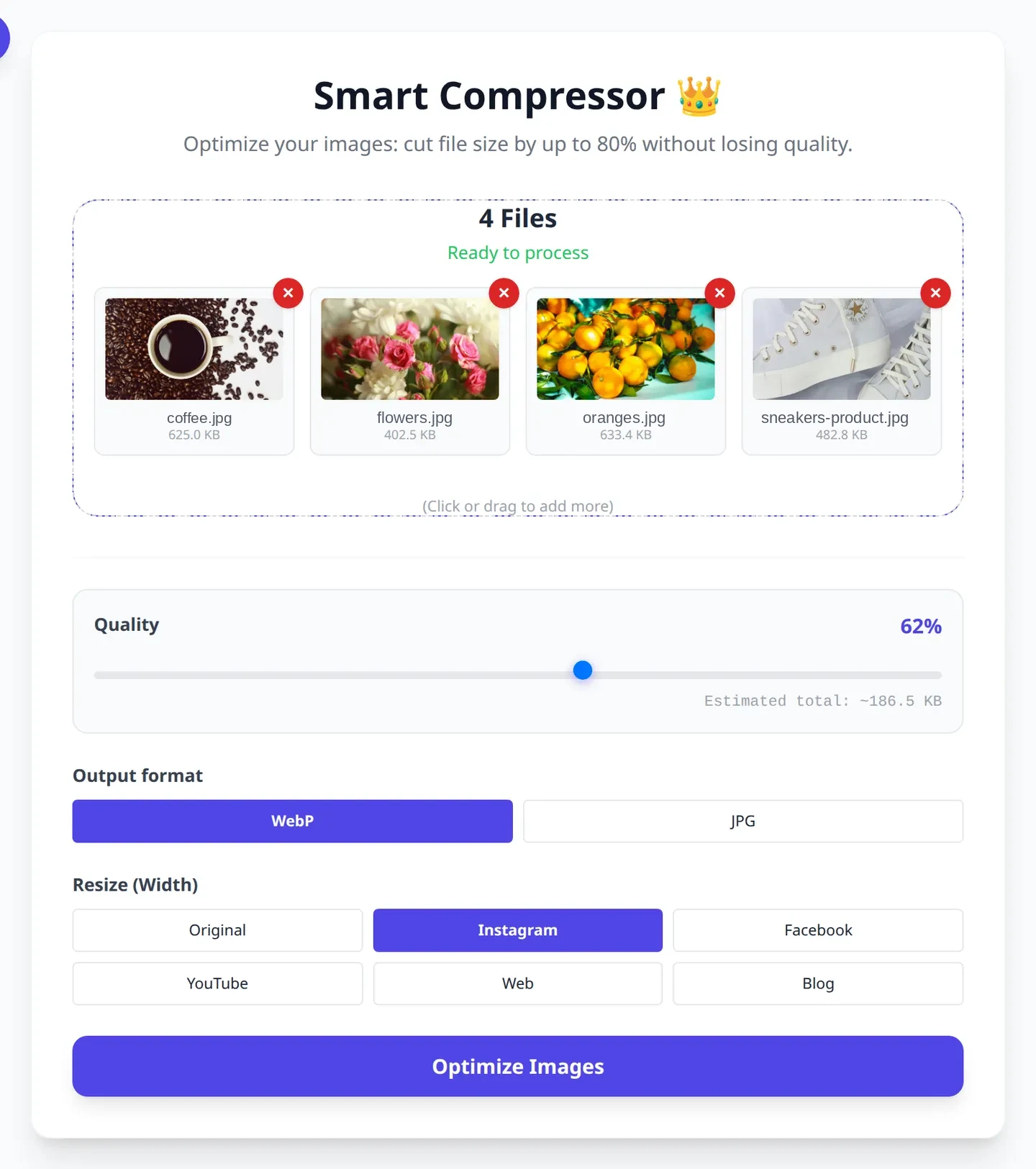
Try OmniPixy's Smart Compressor. Compare before/after with a live slider, with 100% local privacy.
Go to OmniPixy's CompressorThere is also a dedicated page: compress images.
3. A Professional Workflow in 5 Steps
- Resize before compressing: If your web container is 800px wide, don't upload a 4000px photo. Use OmniPixy's Resizer to set the exact dimensions.
- Choose the optimal format: Use WebP or AVIF for modern web content, and JPG for universal compatibility.
- Adjust the quality level: In OmniPixy's Smart Compressor, a quality level of 75% to 82% typically cuts weight by 70% with no visible loss.
- Compare with the interactive slider: Inspect high-contrast areas and faces to confirm there are no artifacts.
- Download the ZIP package: Save all your optimized, sequentially renamed files to keep your library organized.
4. Common Mistakes to Avoid
- Using PNG for photographs: PNG is meant for images with transparency or text. Saving photos as PNG produces files up to 5 times heavier than necessary.
- Uploading files straight from your phone: Smartphone photos come at excessive resolutions. Resizing them before publishing saves megabytes.
- Compressing the same file repeatedly: Compressing an already-compressed JPG destroys quality. Always keep a clean copy of the original file.
Conclusion
Compressing your images is the task with the highest technical return on investment for any website. With the free OmniPixy suite, the whole process happens in seconds directly in your browser, guaranteeing maximum performance and absolute privacy.
Using WordPress? The free OmniPixy plugin compresses your images in the browser before they reach the media library.
A Detailed Guide to Performance and User Experience
Web performance in 2026 is one of the most decisive pillars for the success of any digital strategy. When a user opens a page on a mobile device or a connection with limited coverage, every millisecond of delay in downloading media assets exponentially increases the chance they'll leave. Optimizing images isn't just about saving server space — it's about delivering a smooth, instant experience to every visitor.
Local processing through browser-based tools like the OmniPixy suite makes a fundamental difference compared to traditional platforms. By running all compression, conversion, and resizing algorithms 100% natively on your device via WebAssembly and modern JavaScript, your confidential photos and documents are never transmitted to third-party servers, keeping you in full control of your privacy.
Core Principles for Visual Optimization
- Exact dimension matching: Always export the image at the maximum resolution the on-screen container will actually need. Avoid uploading 4000-pixel photos for an 800-pixel space.
- Strategic format selection: Use WebP and AVIF for everyday web design thanks to their superior compression, and reserve JPG for guaranteeing compatibility with older tools or physical printing.
- Accessibility metadata: Write clear, contextual alt text to improve search engine rankings and ensure accessibility for screen-reader users.
- Standard color profile preservation: Confirm your files use the sRGB color space to prevent visual tones from shifting when displayed on different monitors or mobile screens.
Frequently Asked Questions (FAQ)
How long does it take to compress a batch of 20 photos?
With 12-megapixel phone photos, between 10 and 30 seconds on a recent laptop. Compression runs on your machine: bigger batches and heavier originals take longer, but there is no queue and no upload limit.
Lossy or lossless compression?
Lossy for photos: that is what delivers the 60-80% saving. Lossless only makes sense for screenshots with text, logos or graphics, where a single artefact is immediately visible.
Does compressing the same photo twice damage it?
Yes. Every lossy pass throws away more information from an already compressed file, so artefacts pile up. Always keep the original and compress once from it.
W3C Standards and the Future of Digital Imagery
With the rapid evolution of OLED mobile screens and high-resolution 4K/8K monitors, the standards defined by the W3C consortium for web graphics increasingly emphasize adaptive visual experiences. Adopting optimized workflows through OmniPixy's local tool suite ensures your website strictly meets the accessibility, internationalization, and response-speed recommendations demanded by leading search engines.
For online stores, take a look at our dedicated guide to image optimization for WordPress and Shopify.